
 Loading...
This software is portable and does not need installation. It is intended for advanced users because has a command line interface and advanced functions that could cause permanent data lose if you don’t know how to use it.
Is able to undelete files, recover lost partitions or delete all data from a partition.
1. Command line interface
To use the program, double click on executable file and you will see a command line interface, like MS-DOS. You will use arrows and keys to perform different tasks, no mouse.

2. Analyze disk and search lost partitions
One feature is to detect lost or deleted partitions, in order to recover them.

3. Undelete files or recover
Through Advanced menu you will go in a new section where you can choose Undelete (down) after you select partition.

4. Get back deleted files
After will scan and detect deleted files, it provides instructions how to select all and copy those files inside TestDisk’s folder.

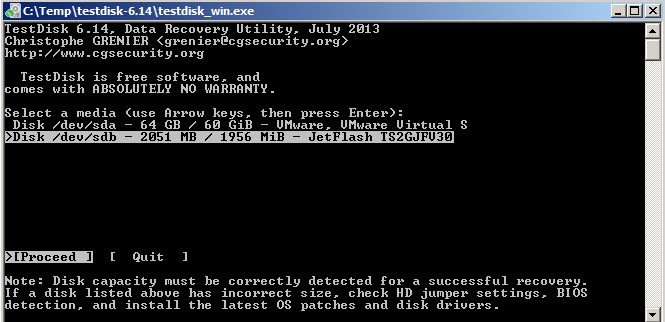
5. Works with USB or other devices
The program is able to detect devices connected to computer and you can perform the same actions
6. Other features
With this tool you can also change disk geometry, delete all data from a partition or write a copy of MBR to first sector. MBR (master boot record) stores data about how logical partitions are organized.

7. Expert mode
From Options you can choose Expert mode to tweak more settings.

- Download: http://www.filesriver.com/app/42/testdisk
- Visit website: http://www.cgsecurity.org/
- Pros: multiple operations delete undelete
- Cons: only for advanced users command line interface
- OS: Windows 8, Windows 7 32-bit and 64-bit, Windows XP, Vista
- License: Freeware

